Unifying Intelligence: How MCP Servers Empower AI Agent Integration

Introduction - The Rise of Autonomous Agents
Artificial Intelligence is no longer confined to single-purpose models. Today, we have a new wave of autonomous agents, systems capable of reasoning, planning, and executing complex tasks independently. From research assistants to code generators, these agents are becoming the building blocks of next-generation software ecosystems.
However, as the number of agents grows, so does the fragmentation problem. Each operates in isolation, using its own APIs, data structures, and memory systems. The challenge lies in unifying these agents into a cohesive ecosystem where they can share information and tools seamlessly.
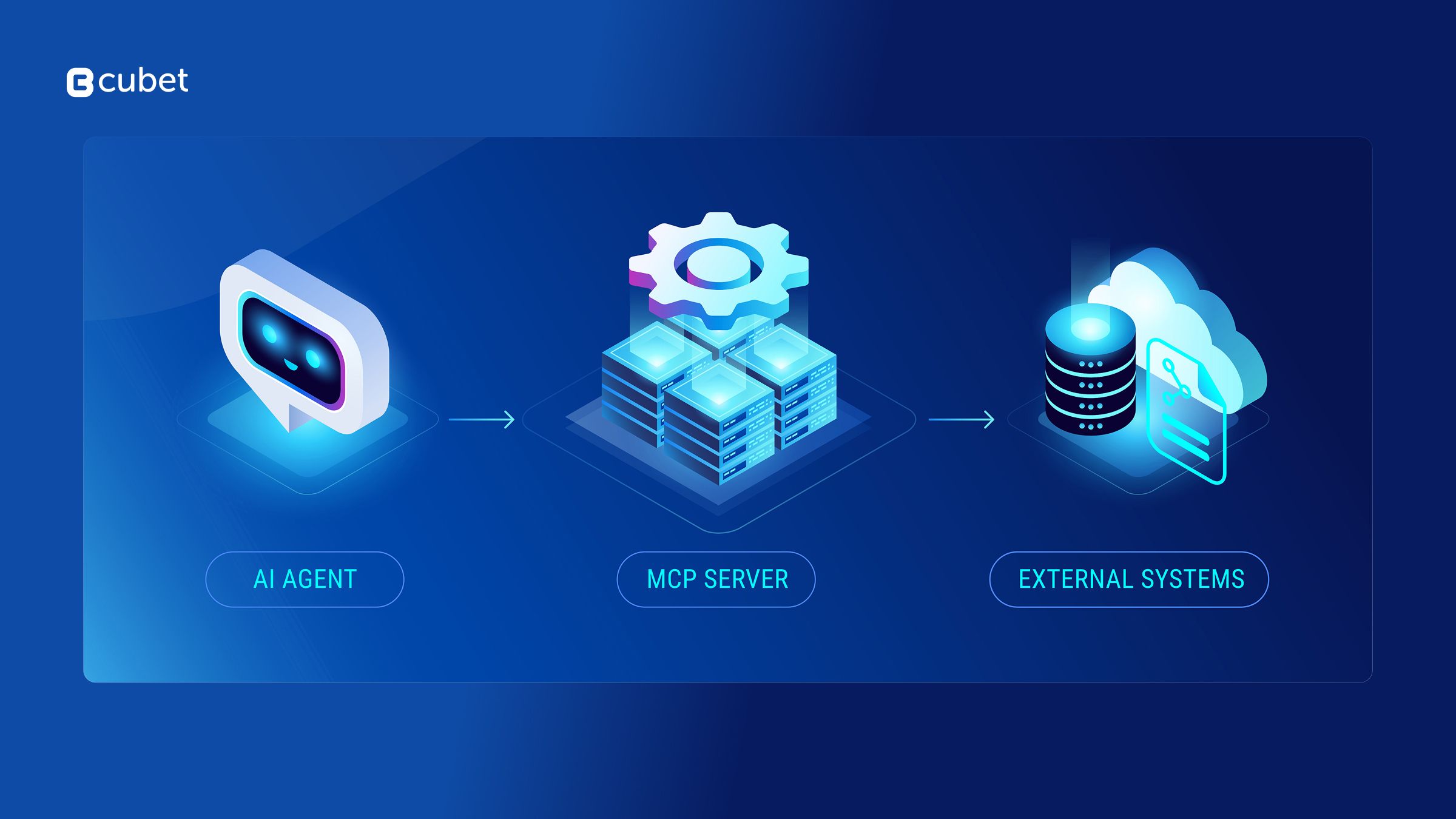
This is where MCP (Model Context Protocol) servers come in. Acting as the standardized interface for agent ecosystems, MCP servers provide a unified connectivity layer. This enables AI agents to securely access the data and tools they need to collaborate, rather than operating in disconnected silos.
The Challenge of Multi-Agent Fragmentation
Imagine a workflow with three distinct agents: one that writes code, another that reviews pull requests, and a third that manages deployments. Individually, they are capable. However, when you attempt to chain them into a cohesive pipeline, the workflow breaks down because they cannot effectively "hand off" work to one another.
Common friction points include:
Context Silos: Agents operate with tunnel vision. The "Reviewer" agent cannot access the "Coder" agent's reasoning or the ticket history, forcing it to make decisions based on incomplete data.
The "N-squared" Integration Problem: Without a standard protocol, connecting every agent to every tool requires bespoke "glue code." If you change your database or your issue tracker, you have to rewrite the integration logic for every single agent.
Brittle Orchestration: Because interfaces vary wildly between tools (some use REST, others GraphQL or CLI), the system that tries to manage these agents becomes complex and fragile. It spends more time translating data formats than actually executing tasks.
This fragmentation limits AI to simple, one-off tasks. To achieve a true system of intelligence, we need a universal standard, a "USB-C for AI", that decouples the agents from the tools they use, allowing for modular and scalable coordination.
The Integration Standard: MCP
MCP (Model Context Protocol) servers provide the architecture to solve this integration bottleneck.
Rather than a central "command center" that controls agents, an MCP Server acts as a standardized bridge. It connects an AI client (the host application) to a specific data source or tool, whether that’s a PostgreSQL database, a Slack workspace, or a local file system.
Instead of writing custom API integration code for every single agent, you simply spin up an MCP Server for your tool. Any MCP-compliant agent can then instantly "plug in" to that server to discover resources, read context, and execute tools without needing to know the underlying implementation details.
Think of MCP not as a message bus, but as a universal driver for AI. Just as your operating system uses standard drivers to talk to any printer without knowing how the hardware works, MCP allows your AI agents to interact with any external system using a single, consistent protocol.
Core Capabilities of MCP Servers
1. Standardized Tool Interface (Tools) Instead of agents needing custom logic to talk to every different API (Slack, GitHub, PostgreSQL), MCP servers expose executable functions as standardized Tools. Whether the underlying action is a SQL query or a shell command, the agent interacts with it using a single, uniform JSON-RPC format. This eliminates the need for "glue code."
2. Direct Context Access (Resources) Replacing vague "shared memory," MCP uses Resources—a primitive that allows agents to read data (like logs, file contents, or database rows) via standard URIs (e.g., postgres://users/123 or file:///logs/error.txt). This gives agents direct, read-only access to the specific context they need to ground their answers, without Hallucinating.
3. Reusable Prompt Templates (Prompts) MCP servers do not "decompose tasks" themselves (that is the agent's job). Instead, they expose Prompts—pre-defined templates that guide an agent on how to use the server effectively. For example, a "Git Server" can offer a "Commit Message Generator" prompt that automatically pulls the diffs and instructs the agent to write a summary.
4. Dynamic Capability Discovery Agents don't need to be hard-coded with knowledge of tools. When an agent connects to an MCP server, it performs a handshake to dynamically discover what tools and resources are available. This allows you to add new capabilities to your AI simply by spinning up a new server, without retraining or rewriting the agent.
5. Client-Controlled Security Boundaries Security is not "centralized" in the server; it is enforced by the Client (Host). The MCP protocol is designed so that the server must ask for permission to execute tools or access resources. This keeps the human in the loop, ensuring that an agent cannot access sensitive files or run destructive commands unless explicitly authorized by the user interface.
Architecture Deep Dive: The Client-Host Model
Here’s a simplified architecture flow: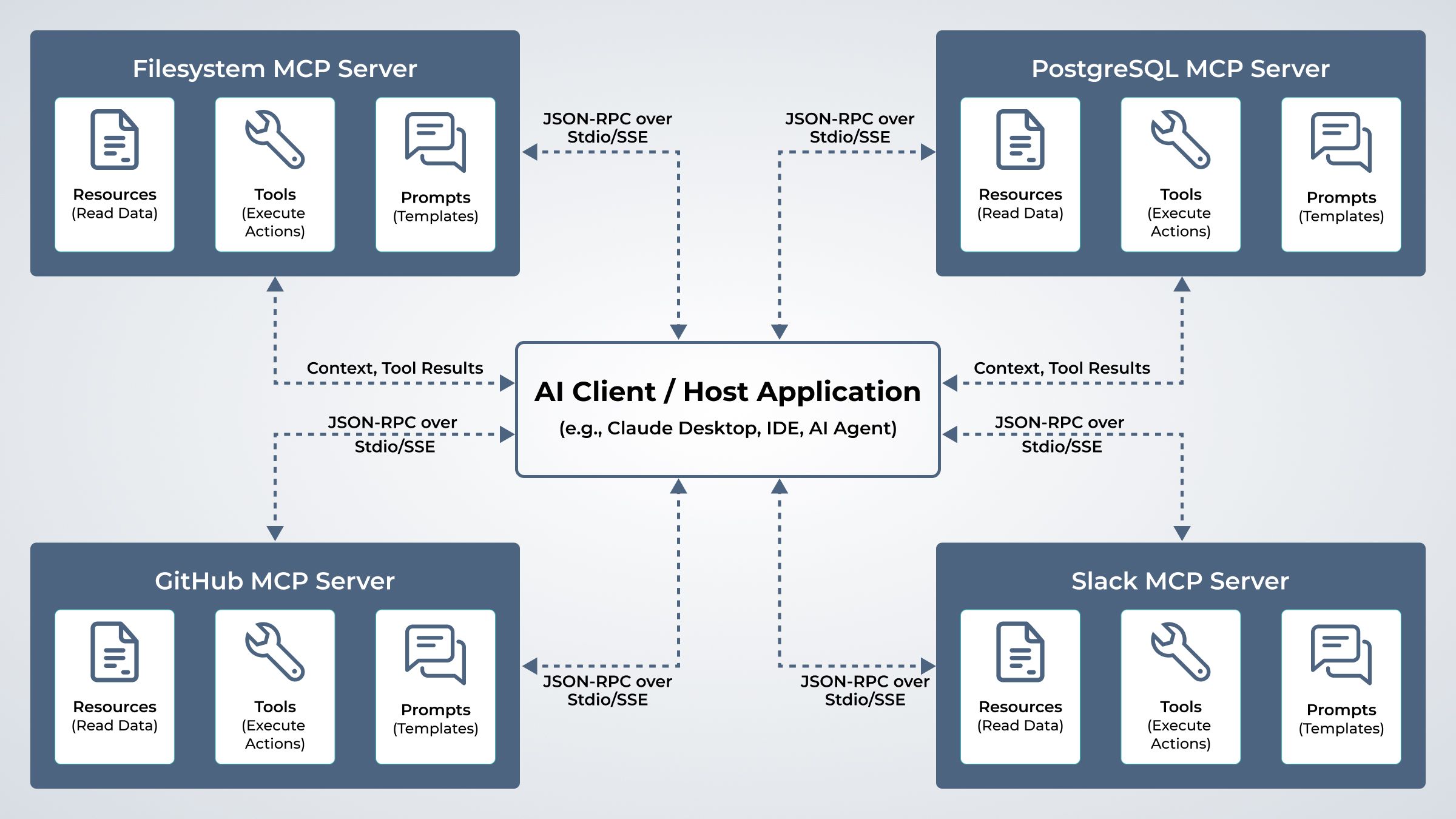
Connection & Discovery: The MCP Client (the "Host" application, like an IDE or AI Desktop app) connects to one or more MCP Servers (e.g., a Database Server, a GitHub Server). The servers essentially say, "Here are the tools and resources I have available."
Intent & Orchestration: The user gives a high-level goal to the Client (e.g., "Generate a report from the latest code metrics"). The Client's LLM analyzes this goal and looks at the menu of tools provided by the connected MCP Servers.
The Execution Loop (Sampling):
- Decision: The Client decides it needs data and sends a Call Tool Request (e.g., fetch_metrics) to the relevant MCP Server.
- Action: The MCP Server receives the specific request, executes the code (queries the database), and returns the raw result (JSON/Text) back to the Client.
- Reasoning: The Client reads this new info, realizes it needs to analyze it, and sends a second request (e.g., analyze_data) to the same or a different Server.
Synthesis: The Client aggregates all the responses it gathered from the various servers and synthesizes the final answer for the user.
The Shift: This architecture transforms the MCP Server from a "manager" into a modular utility. The intelligence stays with the User/Client, while the Server provides the reliable "hands and eyes" to interact with the world.
Example MCP Servers and Ecosystem Integrations
MCP servers can connect to a wide range of tools and platforms. Below are a few examples of existing or conceptual MCP implementations:
Popular Integrations
Jira MCP Server: Enables agents to create, assign, and track issues programmatically using natural language.
ClickUp MCP Server: Allows automation of task creation, status updates, and time tracking.
Slack MCP Server: Bridges communication between agents and users through real-time collaboration.
GitHub MCP Server: Lets agents manage repositories, pull requests, and CI/CD pipelines.
Notion MCP Server: Provides read/write access to documents, notes, and project databases.
PostgreSQL MCP Adapter: Acts as a data layer, enabling agents to store or query structured data consistently.
Custom FileSystem MCP Server: Handles local file I/O for build automation, logs, and code management.
These examples demonstrate how MCP can unify business operations, development workflows, and research pipelines.

Example Integration with Claude CLI
You can integrate Claude CLI (from Anthropic) with an MCP server to create a seamless agent interface. Here’s a minimal example:
# Step 1: Add to claude
claude mcp add --transport sse atlassian https://mcp.atlassian.com/v1/sse
# Step 2: authenticate
claude> /mcp
# Step 3: Run a command through Claude (delegated via MCP)
claude> Analyse JIRA issue SCOR-5808
This setup allows Claude to act as the orchestrator while MCP handles communication with backend agents like Jira, ClickUp, or DevOps bots, enabling full workflow automation via simple natural language.
Real-World Applications: MCP in Action
1. DevOps Automation: Infrastructure as Context Instead of a "monitoring agent" notifying a server, think of a DevOps MCP Server that connects your AI directly to your cloud infrastructure (e.g., AWS or Kubernetes).
The Workflow: An AI Client observes system logs via MCP Resources. When it detects an error, it uses the MCP Server's Tools to fetch metrics or restart a pod. The MCP Server acts as the safe, standardized "hands" for the AI to interact with the infrastructure.
2. Research & Writing: Grounded Generation MCP Servers bridge the gap between an AI's general knowledge and your specific private data.
The Workflow: A "Research Client" connects to a Web Search MCP Server and a Local Filesystem MCP Server. It uses the search server to gather fresh data and the filesystem server to read your existing notes. It then synthesizes this information to write a report that is factually grounded in both external sources and your internal documents.
3. Software Development: Context-Aware Coding This is the most mature use case (used by tools like Cursor or Windsurf).
The Workflow: An IDE (acting as the MCP Client) connects to a GitHub MCP Server and a PostgreSQL MCP Server. The AI doesn't just guess code; it uses the servers to read the actual database schema and search the existing codebase. This allows it to generate code that is syntactically correct and perfectly aligned with your project's specific architecture.
4. Cybersecurity: Standardized Remediation Security teams often struggle with dozens of disconnected tools (scanners, logs, firewalls).
The Workflow: A "Security Analyst AI" connects to a Splunk MCP Server (for logs) and a CrowdStrike MCP Server (for endpoint protection). The AI can query logs and isolate an infected host using a single, unified interface, without needing to know the proprietary API syntax of every security tool in the stack.
Implementing Your First MCP Server
Building an MCP server is simpler than building a full agent because you don't need to handle the reasoning logic. You are essentially building a standardized API wrapper.
The Three Primary Layers:
The Transport Layer: Handles the physical connection.
Stdio: (Standard Input/Output) Best for local tools running on the same machine (e.g., a file system server).
SSE (Server-Sent Events): Best for remote servers (e.g., a cloud-hosted weather service).
The Protocol Layer (JSON-RPC): The standardized message format. You don't write this from scratch; you use the official SDKs to handle the handshake, message framing, and error handling.
The Capability Layer:
Expose Tools: Define functions (inputs/outputs) the AI can call.
Expose Resources: Define URI patterns for reading data.
Expose Prompts: Define templates to guide the AI.
Recommended Tech Stack:
Official SDKs: TypeScript (Node.js) and Python. These are the primary supported languages by Anthropic and the community.
Transport: Stdio (for local CLI tools) is the most common starting point.
Integration: You don't need LangChain or Ollama inside the server. The server is framework-agnostic. It just speaks JSON-RPC.
Corrected Example Use Case:
User says: "Check the deployment status."
The Client (AI): Translates this intent into a tool call: call_tool("get_deployment_status").
The MCP Server: Receives the JSON request, runs the underlying script (e.g., kubectl get pods), and returns the text output.
The Client (AI): Reads the output and says to the user, "The deployment is currently healthy."
The Future of Agent Integration
MCP represents the shift from "All-in-One" AI apps to a Modular Ecosystem.
As the protocol matures, we will move away from building monolithic agents that try to do everything. Instead, developers will focus on building high-quality MCP Servers for specific domains (e.g., a generic "Linear Issue Tracker Server" or a "Google Drive Server").
Interoperability as Default: A single "Stripe MCP Server" can be used by any AI client—whether it's Claude, a generic open-source model, or a custom enterprise bot.
The "App Store" for AI: We are already seeing the emergence of public registries (like Glama or Smithery) where users can find and install MCP servers to instantly give their AI new capabilities.
Conclusion
MCP servers are the "USB-C" for Artificial Intelligence.
Just as USB allowed us to connect any peripheral to any computer without custom wiring, MCP allows us to connect any data source or tool to any AI model without custom code.
By decoupling the Intelligence (the Model/Client) from the Context (the Server/Tools), we solve the fragmentation problem. The future of AI isn't about one super-model knowing everything; it's about a lightweight model having instant, standardized access to every tool it needs to get the job done.
The true power of MCP lies not in "orchestrating agents," but in democratizing access to the world's data for every AI.
If you’re building agents or planning to integrate smarter workflows, MCP is the foundation you shouldn’t overlook. Whether you're an engineer, architect, or decision-maker, understanding and adopting this protocol puts you ahead of the curve.
Let’s talk about how MCP can power your next product.

Anuragh K P
Team Lead





Get in touch
Kickstart your project
with a free discovery session
Describe your idea, we explore, advise, and provide a detailed plan.